


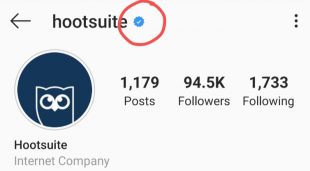
The blue check helps people avoid imposter accounts and easily find the brands or public figures they want to follow. It appears in search as well as on your profile and in embedded posts. This helps people make sure they find the real accounts for the people and brands they’re searching for.
For instance, it can help you tell at a glance the difference between a celebrity account and a fan account for that celebrity. For brands, it can help avoid knock-offs stealing your thunder, and your followers.
Beyond that, though, it’s a bit of a status symbol. After all, according to Instagram itself, the verification badge is evidence that you’re “notable.”
Who is eligible to be Instagram verified?
The coveted blue check wouldn’t be coveted if it was easy to attain.
Instagram verification is reserved for accounts that Instagram deems “in the public interest.” More specifically, you must be a public figure, celebrity or global brand.
You must adhere to the network’s Terms of Service and Community Guidelines. And, as Instagram explains on its website, your account must also be:
- Authentic. Obviously you have to be who you say you are. That is, a real person, registered business, or brand.
- Unique. Only one account per person or business can get Instagram verified, with exceptions for language-specific accounts. Instagram says it does not verify general interest accounts like meme roundups. Fan accounts also don’t qualify.
- Public. If you’re looking to verify your Instagram account, surely your account is already viewable to everyone, yes? While some brands have experimented with private Instagram accounts, these accounts do not qualify for verification.
- Complete. You must have a complete bio, profile photo, and at least one post.
- Notable. Again, Instagram stresses that verified accounts must “represent a well-known, highly searched for person, brand, or entity.”
Even if you already have a verified badge on Facebook, that doesn’t mean you will be eligible to get verified on Instagram. Getting verified on Facebook is easier.
Whereas Facebook grants verification small businesses and organizations, Instagram says it will only grant a verified badge to “notable” accounts that are “in the public interest” and “have a high likelihood of being impersonated.”
How to apply to get verified on Instagram
Here’s the good news. Applying to get verified on Instagram only takes a few moments. Here’s how to do it in three easy steps.
Step 1: Log in
Log into your account. If you have more than one Instagram account, make sure you’re logged into the account you want to verify.
Step 2: Request verification
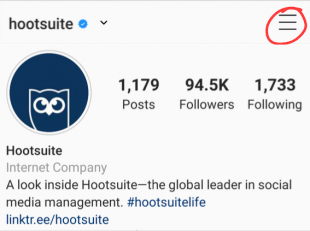
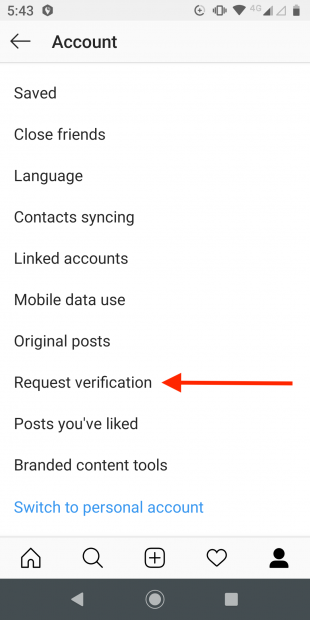
1. Tap the menu icon in the top right corner of your profile.
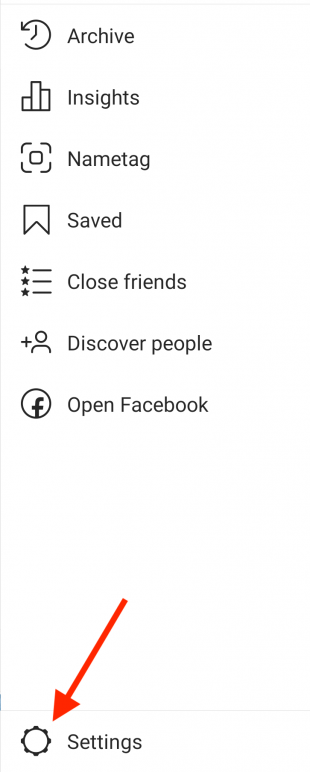
2. Click the Settings gear icon at the bottom of the screen.
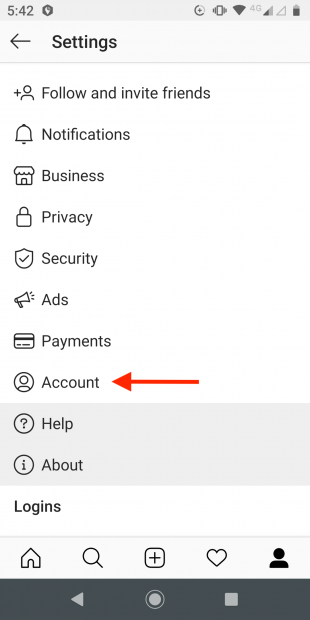
3. Tap Account.
4. Tap Request verification.
Step 3: Confirm your identity
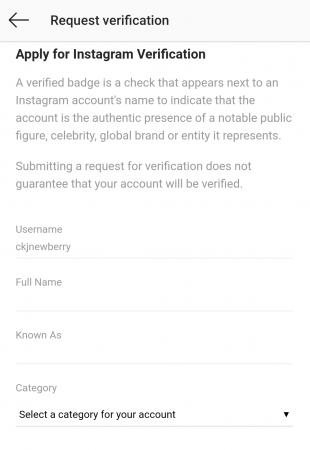
1. Fill in your Instagram account name and complete the following fields:
- Full Name: Your full, legal name, as it appears on your government-issued identification.
- Known As: This could be your name or the name of your company. Use the name that people generally know you as. For example, if you usually go by a nickname or use your middle name instead of your first name, enter that information here.
- Category: You can choose from news/media, sports, government/politics, music, fashion, entertainment, blogger/influencer, business/brand/organization, or other. Pick the one that makes the most sense for your Instagram account.
2. Upload a copy of your government-issued photo ID or an official business document. For an individual, you could use a driver’s license, passport, or government-issued identity card. For a business, you could use a tax return, a utility bill in your company name, or your articles of incorporation. Make sure the name on your document matches the name you entered above.
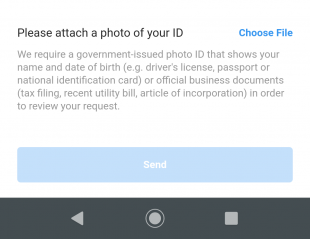
3. Tap Send.
Once you hit the send button, Instagram will review your application for verification. Among other factors, they will be looking to “confirm the authenticity, uniqueness, completeness and notability” of your account.
After reviewing your application, Instagram will notify you whether your request is approved or denied. You’ll see the message in your Instagram notifications. But don’t expect a response right away. There’s no specified timeline for how long the process takes, but it’s generally at least a couple of days.
Keep in mind that Instagram will never ask you to pay for verification, and they will not send you an email asking about your verification request. If you get a request to pay, or an email to send more details, you’re being scammed.
